Someone Used AI Assistants To Scan My Server For Secrets

Somebody probed my server for secrets a few weeks ago. They didn't use a scanner, a botnet, or a single line of code. They opened a chat window and asked an AI assistant to fetch my configuration files, and it did, because that is what it does. You ask it to check a URL, it checks the URL.
Sixteen requests. Environment files, cloud service keys, a git repository, a live memory dump of the running application. The person who sent them never touched my server once.
And it wasn't one assistant. It was OpenAI, Anthropic and Perplexity: three companies, one sweep, all of them infrastructure I had deliberately allowed through.
This post is the reference version of that incident. The evidence first, then why this shape of traffic defeats defenses that have worked for twenty years, then an audit you can run tonight, then the settings that answer it. The video below tells the same story if you would rather watch it.
The evidence
I only found this because I run everything through Cloudflare, and their AI Crawl Control dashboard shows what AI crawlers request and what gets denied. Sixteen probes, every one of them asking for a config file, every one pointed at the same host.
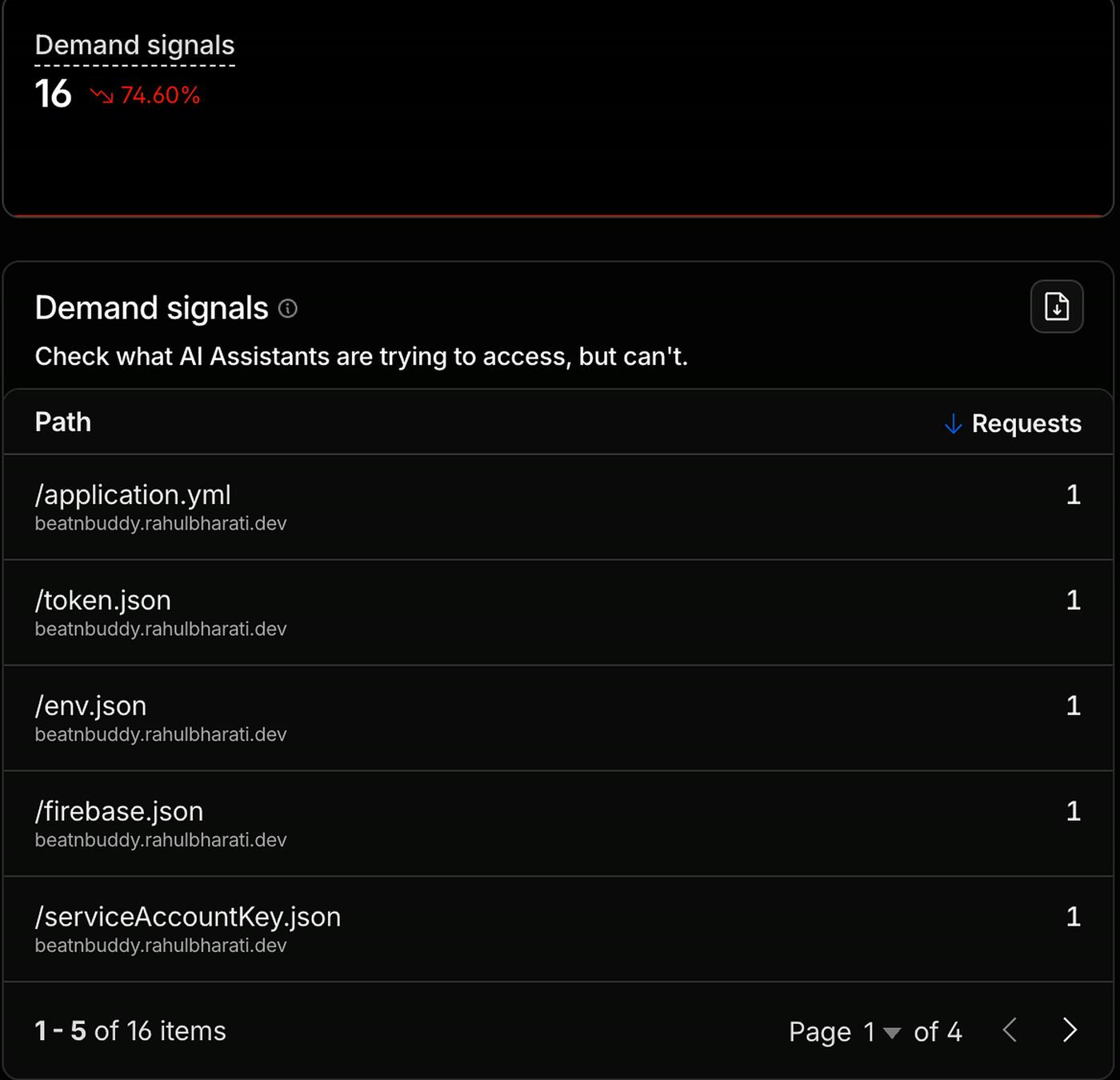
And underneath it, the same window broken down by company.
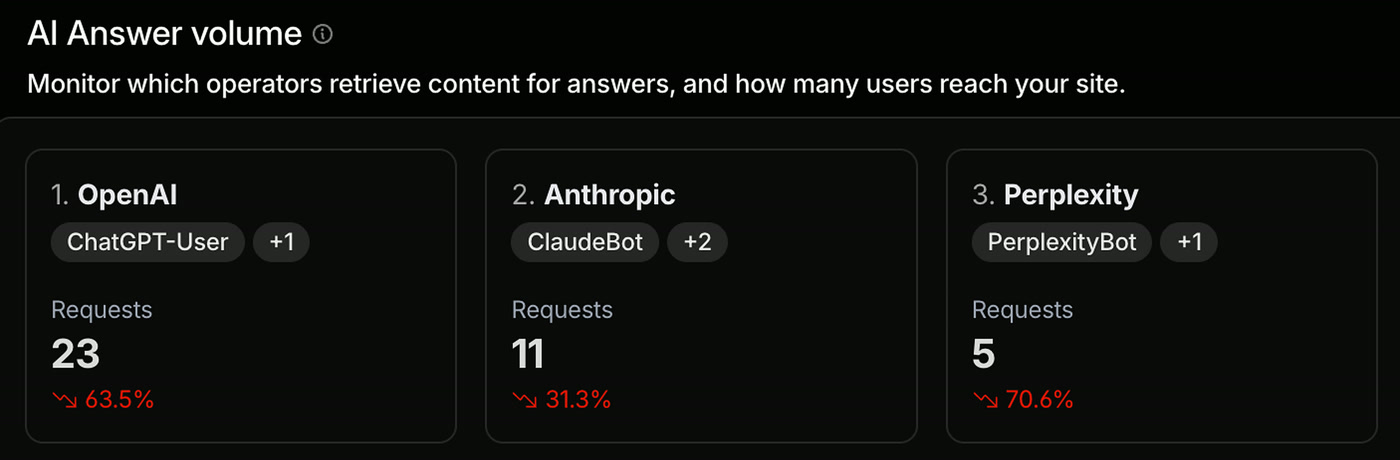
Twenty three requests from OpenAI, eleven from Anthropic, five from Perplexity, in a single day. On my main domain over the same window, OpenAI made 46 and Perplexity 17 against a separate set of 19 probed paths.
What this data does not prove. The Optimization view shows which companies the traffic came from, and separately which paths were demanded. It does not attribute a specific path to a specific provider. So I cannot tell you Perplexity asked for my environment file, only that the probes arrived inside AI traffic from three providers. Cloudflare's Metrics tab does go further and can filter paths by crawler and operator. The panels above cannot.
Why your existing defenses do not see this
A scanner hits you with a thousand requests from one address in ten seconds. Your rate limiter sees the burst, your firewall bans the address, your bot detection flags it as automated. That is a solved problem and has been for two decades.
Route the identical wordlist through AI assistants and all three controls fail, for reasons that are structural rather than fixable.
Sixteen requests split across three providers' published address pools means no per-IP or per-session counter gets near a threshold. Note the precise claim: it is per-client limiters that miss this, and they are the common case. A strict global limit, or a rule scoped tightly to sensitive paths, can still fire. OWASP treats per-client counters as structurally weak against exactly this distribution in API4:2023.
The addresses belong to OpenAI, Anthropic and Perplexity. They do not belong to the person attacking you. OpenAI and Perplexity do publish machine-readable ranges, so you technically can block them, but you would be blocking all AI traffic and still never reach the attacker.
This is not a malicious bot pretending to be a browser. ChatGPT-User, ClaudeBot and PerplexityBot are documented, self-identifying agents doing exactly what they say on the tin. Your detection passes it because there is nothing to detect.
Then there is the part that should genuinely bother you: you allowed all of them on purpose. We spent two years making sure AI crawlers could reach our sites because we want to appear in AI answers. We opened these doors ourselves, and closing them means disappearing from every AI answer surface at once. Almost nobody will do that, and whoever runs these sweeps knows it.
Three providers is what turns this from an incident into a category. If it were only ChatGPT you could call it a badly behaved product, block one user agent, and move on. Three means it is a property of the idea of an assistant that fetches URLs, not a bug in anyone's implementation.
The distribution also breaks detection at their end. Each provider sees a handful of fetches inside one conversation. Nothing looks unusual from there either, because no single provider observes enough of the pattern to recognise a sweep.
This is a new attack, so there must be a new defense for it.
The sweep is old. It is the same wordlist attackers have used for a decade. Only the delivery is new, which is why the answer is not better detection. It is having nothing worth finding.
Reading the request list: attack or accident
The paths tell you which one you are looking at, and they are worth learning to read, because this is the diagnostic you will apply to your own logs.
Mine asked for five environment file variants (production, staging, test, local, and one inside a backend folder), plus .env.old.
Stop on that last one, because it explains what these lists actually are.
You have done this. You are about to change your environment variables, so you rename the old file first. .env becomes .env.old. Just in case. Then you never think about it again.
No tool creates that file. It exists only because a human made it and forgot. Nobody guessed the filename either. It is on the list because somebody found a real one, on a real server, and wrote it down.
These are not lists of clever attacks. They are catalogues of mistakes that already worked on somebody else. That is why the defense is hygiene rather than cleverness.
What the rest of the list is worth, if it lands:
.env.env.*application.ymlEvery credential the app holds, in plain text.
serviceAccountKey.jsonfirebase-adminsdk.jsonAdmin credentials that bypass every database rule you wrote, by design.
/.git/The whole repository reconstructed with git-dumper, including the secret you removed in your very next commit.
*.bakwp-config.php.bakSource served as plain text, because the server does not know how to execute that extension (OWASP WSTG).
/actuator/heapdumpA photograph of everything in memory: passwords, signing secrets, live sessions. One request and there is nothing left to break into.
*.js.mapYour client bundle deminified: original names, comments, folder structure.
None of these are content. Nobody asks an assistant to summarise their environment file. The moment these paths appear together, you know what you are looking at.
Audit yourself in twenty minutes
This is the part a video cannot give you. Run these tonight, against your own domains, before you change a single setting. Every one of them is read-only.
1. Can you see AI crawler traffic at all?
grep -Ei 'ChatGPT-User|OAI-SearchBot|GPTBot|ClaudeBot|Claude-User|PerplexityBot|Perplexity-User' \
  /var/log/nginx/access.log
If that returns nothing, it is not the same as being safe. It usually means you are not logging it. This attack does not spike bandwidth and does not trip an alert. It looks like a few requests from reputable companies.
Do not add Google-Extended to that list. It is a robots.txt product token controlling whether already-crawled content may be used for Gemini training and grounding. It never issues a request, so it can never appear in an access log. Google's own documentation is explicit about this. Search for Googlebot instead. Grepping for a token that cannot appear returns zero results and teaches you the wrong lesson.
2. Did a secret get into your build?
A clean repository is not a clean deployment. Inspect the artifact itself rather than trusting your ignore file:
docker create --name audit-check your-image:latest
docker export audit-check | tar -t | grep -E '(^|/)\.env' || echo "clean: no env files in image"
docker rm audit-check
3. What headers do you actually return?
Not the ones you configured. The ones that arrive:
curl -sI https://example.com | grep -Ei \
  -e 'strict-transport|content-security|x-frame|x-content-type' \
  -e 'referrer-policy|permissions-policy|x-powered-by|^server:'
Read it twice: once for what is missing, once for anything appearing twice or announcing your stack.
4. What have you published without meaning to?
Every publicly trusted certificate is recorded in a public log. That means every subdomain you ever gave HTTPS is searchable, permanently:
curl -s 'https://crt.sh/?q=%25.example.com&output=json' | jq -r '.[].name_value' | sort -uThen read your own LinkedIn, resume and portfolio as if you were building a target list. That is the other half of the enumeration, and you wrote it yourself.
The eight settings that answer this
Nothing clever, nothing specific to one stack. Every item is a setting you can apply at your framework, your web server, or your CDN.
This is the one that saved me. Adding your env file to .gitignore keeps it out of version control, and almost everybody does that. But the file is still on your machine, and when your deployment packages the app, unless you have separately excluded it, it ships to the server. Two different systems. Protecting one still leaks the secret. Exclude recursively so nested env files are caught too, and keep the example file:
**/.env
**/.env.*
!**/.env.example
Those sixteen requests got nothing because the files were never in the image to begin with.
Any reputable CDN does this. The public internet never sees the real address of the machine your code runs on, and every request passes through something watching first.
Strict-Transport-Security: max-age=31536000; includeSubDomains; preloadTwo traps here. First, HSTS is trust-on-first-use: it only binds after the browser has received one valid HTTPS response carrying the header, so the first visit is unprotected unless you submit the domain to hstspreload.org. Second, if your CDN and your application both send this header, only one counts. RFC 6797 says the browser must process the first one it receives, and in practice most edges replace the origin's header rather than appending, so the edge value is what arrives. Set it in both places, then read the response you actually get with the curl above.
Content-Security-Policy-Report-Only: default-src 'self'; object-src 'none'; base-uri 'self'Watch what breaks, fix it, then rename the header to enforce. Going straight to enforcement on a live site is how you take your own site down. And be honest about what CSP buys you: it stops injected code only if the policy is strict. Google's study of roughly 100 billion pages found bypasses in 94.7% of real-world policies, overwhelmingly 'unsafe-inline' and permissive host allowlists, which is exactly what most of us write on the first attempt. Nonces plus strict-dynamic are what actually deliver the promise.
Most frameworks announce themselves by default through X-Powered-By, and web servers through Server. That one line tells an attacker which stack to target and which config filenames to try. Turn it off at the framework and strip it at the edge (OWASP HTTP Headers).
Content-Security-Policy: frame-ancestors 'none'
X-Frame-Options: DENY
X-Content-Type-Options: nosniff
Referrer-Policy: strict-origin-when-cross-origin
Permissions-Policy: camera=(), microphone=(), geolocation=(), payment=()
frame-ancestors 'none' is the primary clickjacking control and X-Frame-Options the legacy backstop. Both must be response headers: a meta tag does nothing. This kills iframe clickjacking, not every UI-redress trick (OWASP).
If your framework has an image optimiser or asset proxy, allowlist the hosts it may reach. Some fetch and transcode from anywhere by default, which turns your server into an open proxy someone can point wherever they like. imgproxy allows every source when IMGPROXY_ALLOWED_SOURCES is blank, and blank is the default. Next.js is the counter-example: remote hosts are deny-by-default. Know which one you are running.
They turn minified JavaScript back into readable source: comments, internal names, original folder structure. To be precise about the blast radius, source maps expose the browser bundle, not server-side environment variables. The exception is a value your build inlined into client code through a NEXT_PUBLIC_* or VITE_* prefix. A leaked source map is not equivalent to a leaked .env, and conflating the two leads people to fix the wrong thing.
That is not a rewrite, it is an afternoon. And it is the difference between being interesting to an attacker and being a waste of their time.
The setting that is not on the list: knowing what you still run
Every item above hardens a thing you remember owning. The sweep did not land on a thing I remembered owning.
My main domain had already been tightened, and afterwards it went quiet. So I looked at my old domain, the one I ran everything on before I migrated. I had migrated it properly: it redirects to the new one, so a sweep against it goes nowhere.
But a redirect on a domain does not cover its subdomains.
Years ago I stood up a subdomain for a hackathon project. It pointed at its own deployment, so it was never part of that redirect, and it just kept running. Quietly. For years. That is where all sixteen requests landed.
Two things make that subdomain findable, and both are things you did to yourself:
You published it. That project is on my LinkedIn, my resume and my portfolio. Like most developers, I have helpfully published a complete list of everything I have ever built.
Or Certificate Transparency did. The moment you gave a subdomain HTTPS, its name went into a permanent, public, searchable log. The entry survives the certificate expiring and the DNS record being deleted. And querying those logs never touches your server, so you have no way of knowing anyone looked.
The precise scope, because this is often overstated. Chrome has required CT for publicly trusted certificates issued after 30 April 2018 (policy); Safari added its policy in 2021 and Firefox only enforces from version 135 in 2025. Certificates from private or enterprise CAs are exempt and never appear. And a wildcard certificate logs as *.example.com, which does not publish the individual subdomain name. Wildcards are a genuine mitigation here, not just a convenience.
The thing still answering in your name is almost never the site you are thinking about. It is the staging environment from a client project that ended three years ago. The demo you deployed for a talk. The subdomain you spun up to test something and never took down.
So what did I do about mine? I did not harden it. I deleted it. There was nothing worth protecting, and the right fix was not a better lock on the door. It was removing the door.
What to take away
None of this is an argument for building less. AI has made it possible to ship something real in a weekend, and that is good. But the same tools letting you ship faster let attackers probe faster, through infrastructure you deliberately trust, at almost zero cost. And every project you ship adds another domain, another certificate, another permanent public record that keeps running long after you have forgotten it.
Three things worth keeping:
AI assistants are not scanners, and the mismatch is structural rather than a gap someone will patch. Stop planning to catch the request and make sure there is nothing worth returning.
Version control and build packaging are two separate systems. Protecting only one still ships the secret.
You cannot configure a security header on a deployment you do not remember owning. Enumerate yourself on a schedule, and delete rather than harden whatever has no reason to exist.
The most secure file on my server is the one I never shipped. And the most secure project is the one I deleted.