Mastering Promises and Async/Await in JavaScript: Best Practices and Code Examples

Mastering Promises and Async/Await in JavaScript: Best Practices and Code Examples
When working with long-running tasks in JavaScript, like getting data from APIs, manipulating the Document Object Model (DOM), or running complex calculations, you have to use asynchronous programming. In the past, callback functions were used to handle code execution that happened at different times. However, this method often led to code that was hard to understand and long. Promises and async/await are two strong features in Javascript that have become available in recent years. These tools make it much simpler and easier to maintain asynchronous programming.

This article provides in-depth coverage of Promises and async/await. Best practices will be discussed, and code snippets will show how they can be used. The fundamentals of async/await, including constructing and chaining Promises, using Promise.all(), handling errors, migrating from callback-based APIs to Promises, and using try/catch blocks, will be covered in detail.
What are Promises?
APromise is a proxy for a value that is not necessarily known when the promise is created. It lets you link handlers to an action's eventual success value or reason for failing. This lets asynchronous methods return values like synchronous methods: instead of immediately returning the final value, the asynchronous method returns a promise to supply the value at some point in the future.
APromise is in one of these states:
- pending: initial state, neither fulfilled nor rejected.
- fulfilled: meaning that the operation was completed successfully.
- rejected: meaning that the operation failed.
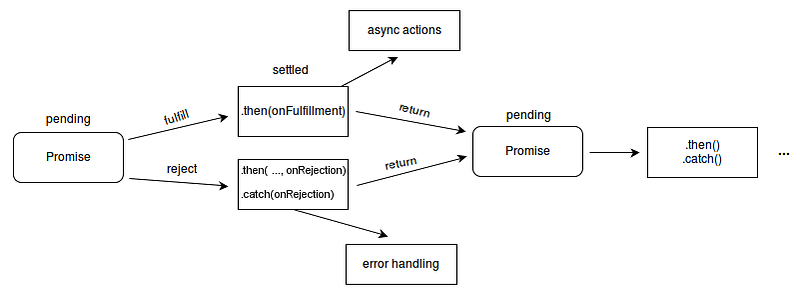
Promises can either be fulfilled with a value or rejected with a reason (error) as to why. When either of these options occurs, the associated handlers queued up by a promise’s then method are called. If the promise has already been fulfilled or rejected when the handler is attached, the handler will be called, so there is no race condition between an asynchronous operation finishing and its handlers being attached.
Here’s an example of how to create a Promise:
const myPromise = new Promise((resolve, reject) => {
  // Some asynchronous operation
  const result = 42;

  if (result) {
    resolve(result); // Promise fulfilled
  } else {
    reject('Something went wrong'); // Promise rejected
  }
});
In the example above, we create a new Promise called myPromise. Inside the Promise executor function, we perform some asynchronous operations and set the resulting value to result. If the operation is successful, we call the resolve function and pass in the result. If it fails, we call the reject function and pass in an error message.
Promises have three states: pending, fulfilled, and rejected. When a Promise is created, it is in the pending state. If the operation is successful, the Promise transitions to the fulfilled state and the then() method is called with the resolved value as an argument. If the operation fails, the Promise transitions to the rejected state and the catch() method is called with the rejection reason as an argument.
Chaining Promises
It is possible to execute a sequence of asynchronous tasks by connecting many promises together and chaining them together. This is accomplished by having the then() method return a new Promise after doing the desired action. Upon the completion of an operation, the Promise can be “chained” with another then() method to carry out more work.
const promise1 = new Promise((resolve, reject) => {
  setTimeout(() => {
    resolve('Promise 1 resolved');
  }, 1000);
});

const promise2 = new Promise((resolve, reject) => {
  setTimeout(() => {
    resolve('Promise 2 resolved');
  }, 2000);
});

promise1
  .then((result) => {
    console.log(result);
    return promise2;
  })
  .then((result) => {
    console.log(result);
  })
  .catch((error) => {
    console.error(error);
  });
In the example above, we create two Promises that resolve after a certain amount of time. We chain them together by returning promise2 from the first then() method. When both Promises have resolved, the then() method of the second Promise is called, and we log the resolved value to the console.
Using Promise.all()
Promise.all() is a method that enables us to execute many Promises in parallel and wait for all of them to resolve before going on to the next step. As input, it accepts an array of Promises, and as output, it generates a new Promise that, when fulfilled, will produce an array of resolved values in the same order as the input array.
Here’s an example of using Promise.all():
const promise1 = Promise.resolve(1);
const promise2 = new Promise((resolve, reject) => {
  setTimeout(() => resolve(2), 1000);
});
const promise3 = fetch('https://jsonplaceholder.typicode.com/users');

Promise.all([promise1, promise2, promise3])
  .then(([result1, result2, result3]) => {
    console.log(result1); // 1
    console.log(result2); // 2
    console.log(result3); // Response object from fetch call
  })
  .catch((error) => console.log(error));
In this example, we have three Promises: promise1 resolves immediately with a value of 1, promise2 resolves after 1 second with a value of 2, and promise3 is a fetch call that resolves with a Response object. We pass these Promises as an array to Promise.all(), which returns a new Promise. The then() method on this Promise waits for all the Promises to resolve and then receives an array of their resolved values in the same order as the input array.
Handling Errors with Promises
One of the benefits of using Promises is that they give a consistent method of addressing errors. This is one of the advantages of using Promises. We may manage any issues that occur while a function is being executed by using the catch() method on a Promise. This is an alternative to giving an error callback to the function that is being executed.
Here’s an example of using catch() to handle errors:
const promise = new Promise((resolve, reject) => {
  setTimeout(() => reject(new Error('Something went wrong!')), 1000);
});

promise
  .then((result) => console.log(result))
  .catch((error) => console.log(error.message));
In this example, we create a Promise that rejects after 1 second with an Error object containing a message. We then use the then() method to log the resolved value (which we won't receive because the Promise is rejected) and the catch() method to log the error message.
It’s important to note that catch() only catches errors that occur during the execution of the Promise chain it's attached to. If an error occurs in a different Promise chain that's not connected to this one, it won't be caught by this catch().
Converting Callback-Based APIs to Promises
A significant number of JavaScript libraries and application programming interfaces (APIs) continue to rely on callback-based functions rather than Promises. Fortunately, with the help of the Promise constructor, we can easily change these functions so that they yield Promising objects.
Here’s an example of converting a callback-based function to a Promise:
function getUserData(userId, callback) {
  setTimeout(() => {
    const userData = { id: userId, name: 'John Doe' };
    callback(userData);
  }, 1000);
}

function getUserDataPromise(userId) {
  return new Promise((resolve, reject) => {
    getUserData(userId, (userData) => {
      if (userData) {
        resolve(userData);
      } else {
        reject(new Error('Failed to get user data'));
      }
    });
  });
}

getUserDataPromise(1)
  .then((userData) => console.log(userData))
  .catch((error) => console.log(error));
In this example, we have a function getUserData() that accepts a userId and a callback. The getUserData() function simulates an asynchronous operation by using setTimeout() to delay the execution for 1 second. Once the operation completes, it calls the callback function with the retrieved user data.
However, this implementation follows the callback pattern, which can be converted to a Promise-based implementation. The getUserDataPromise() function is a Promise-based implementation of getUserData(). It returns a Promise object that wraps the asynchronous operation in getUserData(). Inside the Promise constructor, we call getUserData() with the provided userId and pass in a callback function that resolves the Promise with the retrieved user data if it's successful, or rejects the Promise with an error if it fails.
We then call getUserDataPromise(1) to retrieve user data with a userId value 1. We use the then() method to handle the resolved Promise and log the retrieved user data to the console. We also use the catch() method to handle the rejected Promise and log the error to the console.
The conversion of callback-based APIs to Promises is a popular use case, particularly when working with libraries or frameworks that make substantial use of callbacks. Putting a callback-based function inside of a Promise can make the code simpler, cleaner, and easier to read and maintain. This is because we can chain promises together, handle failures, and use async/await to simplify asynchronous code.
Using async/await with try/catch
async/await is a newer way to work with Promises that makes writing asynchronous code more concise and easy to understand. It lets us write code that looks like it is synchronous, but is really asynchronous.
With async/await, the async keyword is used to define a function that works in the background and returns a Promise. Inside the function, we use the await keyword to wait for a Promise to finish before moving on to the next line of code. We can also catch any errors that happen while the asynchronous code is running by using a try/catch block.
Let’s see an example of using async/await with try/catch to handle errors:
async function getUserData(userId) {
  try {
    const user = await getUserById(userId);
    const posts = await getUserPosts(userId);
    const comments = await getUserComments(userId);
    return { user, posts, comments };
  } catch (error) {
    console.error(`Error fetching data for user ${userId}: ${error.message}`);
  }
}
In this example, we define an asynchronous function getUserData() that accepts a userId parameter. Inside the function, we use the await keyword to wait for three Promises to resolve: getUserById(), getUserPosts(), and getUserComments(). If any of these Promises reject with an error, the code inside the catch block will be executed, and the error message will be logged to the console.
By using async/await with try/catch, we can make our asynchronous code more readable and easier to reason about. It also allows us to handle errors in a more elegant way than with traditional Promise chaining.
Best Practices
Now that we’ve covered the basics of Promises and async/await, let's look at some best practices for working with asynchronous code in JavaScript:
1. Always return a Promise
When writing an asynchronous function, it’s important to always return a Promise, even if you don’t use Promises inside the function. This lets other programmers use your function with either Promises or async/await, depending on what they need to do.
2. Use Promises for all asynchronous operations
When writing code that involves carrying out an asynchronous activity, like as sending an HTTP request or reading a file from disc, the most effective approach is to make use of an API that is based on a promise. Because of this, your code will become more consistent and easier to reason about.
3. Use async/await for readability
Using async/await in your code can make it easier to comprehend and reason, which is especially helpful when you’re working with complicated asynchronous tasks. But, make sure not to overuse it because doing so can make your code less effective.
4. Use Promise.all() to execute Promises in parallel
Use the Promise.all() method to run more than one Promise at the same time. This will make it easier for your code to run and can improve performance.
5. Always handle errors
When working with asynchronous code, errors are possible and likely to occur. Ensure that errors are always handled via catch blocks or by returning rejected Promises. This will ensure that your code is robust and will not abruptly crash.
6. Avoid nested try/catch blocks
Avoid nested try/catch blocks Asynchronous code can be complex and difficult to debug, especially when errors occur. One common mistake when using async/await is to use nested try/catch blocks. While this can seem like a good idea at first, it can quickly become difficult to read and maintain. Instead, it’s better to use a single try/catch block and handle errors as they occur.
7. Convert callback-based APIs to Promises
Many Node.js modules use the callback pattern, which can make code harder to read and maintain. Fortunately, you can use the built-in util.promisify() function to convert callback-based APIs to Promises.
Asynchronous programming is made simpler and more manageable with the help of crucial techniques like async/await and promises, which are used in current JavaScript development. By gaining an understanding of these capabilities and the best practices associated with them, you will be able to develop code that is more readable, more efficient, and more easily manages asynchronous actions. I hope that this post has given you a solid basis for using Promises and async/await in your projects, and we urge you to continue exploring these technologies and building fantastic JavaScript apps.